Inbound Lead Routing: Every contact form lead to the right regional rep, in minutes
I replaced a one-size-fits-all inbound workflow with a routing system that enriches every contact form lead in Clay, works out its region and hands it to the right regional rep with their own booking link, usually within minutes.
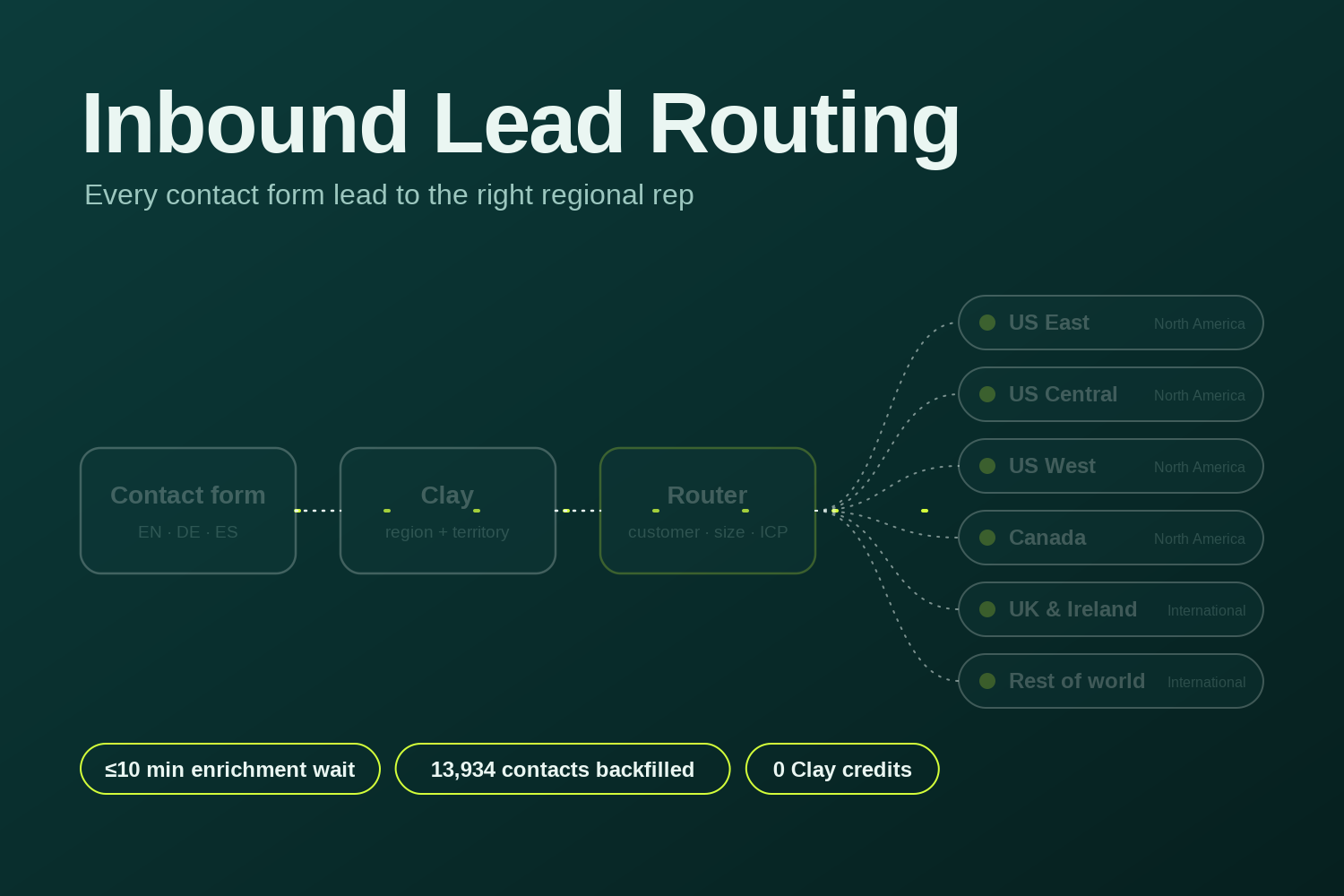
Final Outcome Overview
Contact form leads now reach the right owner by geography: three US territories, Canada, UK and Ireland, and the rest of the world. Customers and companies below the size threshold are filtered out before anyone is assigned. The system went from approved architecture to live in three days, and a one-off backfill tagged 13,934 existing contacts with a region without spending a single Clay credit.
Pain Point to Solve
At the B2B HealthTech company I work for, one HubSpot workflow handled every contact form submission. It ran a few if-branches, but every lead got the same email and the same booking link, whoever they were and wherever they sat. With the expansion into the US and Canada, that stopped working: leads needed to go to the rep who owns their territory, with that rep's calendar.
Three things made it harder than a few new branches:
- Location is not on the form. Country and state come from Clay enrichment, which runs asynchronously after the submission.
- US location data is unreliable. Enrichment often returns "United States" or a metro area instead of a state, and non-US locations were leaking the country into the State field.
- Some leads should never be routed. Existing customers and companies under the employee threshold need their own answer before anyone waits for enrichment.
My Role
I owned it end to end: the architecture, the HubSpot properties, the Clay tables and formulas, the three workflows, the emails and sequence wiring, the backfill script and the documentation for sales. Sales leadership signed off the territory map and the cutover.
How It Works
Clay decides the region, HubSpot only reads it. I kept the state to territory to owner mapping in Clay, which already owns the location data. A 69-row territory map covers every US state and Canadian province. Formulas turn the enriched location into two clean values: a region group (US, Canada, International) and a territory (East, Central, West, UK and Ireland, rest of world, APAC reserved). HubSpot never branches on raw state, so there is no 50-value state property to maintain. The enrichment itself is the pipeline from my HubSpot x Clay Enrichment project; routing adds the territory columns on top.
A completion flag, not a guess. Clay writes the region, the territory and an "enrichment completed" timestamp in the same update, so the flag can never arrive before the region. That lets the router tell "Clay is still running" apart from "Clay finished but found no region", and unresolved leads move on immediately instead of sitting out the full wait.
One router, two regional workflows. The router checks, first match wins:
- Existing customer: Slack alert, support redirect email in their language, no sales handoff.
- Under the employee threshold: marked unqualified with a polite "we focus on larger organisations" email.
- Everyone else is ICP: promoted to MQL, waits up to 10 minutes for enrichment (the first plan assumed hours), then branches by region.
The regional workflows set the contact owner, the owner's job title and their booking link, create a high-priority task with the lead context, and jump into one shared booking sequence sent from the rep: a book-a-meeting email and three reminders. It stops as soon as the lead books or a rep reaches out first, and leads who never book move on to the MQL nurture. Anything without a region falls back to the international owner, so no lead ever dead-ends.
Built to grow. Adding APAC means one new value and one branch. Cutting a region means switching off one workflow. Two email assets cover every region, because only the sender and the link change.
Backfill Without Credits
The routing only stamps new leads, so the existing database had almost no region data. I wrote a Python script that reproduces the Clay formulas locally from fields HubSpot already had, contact-level only (a person is never placed by where their employer is registered) and never overwriting a value. A 25-case self-check guards the classic traps: Belarus must not match "US", Indiana must not match "India", CH is Switzerland and not China. It tagged 13,934 contacts and took region coverage from about 15% to about 73% of the database, with zero Clay credits spent.
What I Caught Before Launch
I reviewed every workflow before go-live and found real bugs: an unenroll rule on "last activity" that would have kicked out every previously active contact instantly, the under-threshold branch sending the customer emails, two territory owners swapped at the criteria level (relabelling the branch did not fix it), and a timeout path that led nowhere. All fixed before the cutover, which only had four leads in flight.
Results
- 3 workflows replaced 1, with 6 new HubSpot properties
- Live three days after the architecture was approved
- Enrichment wait cut to a 10 minute maximum
- 13,934 existing contacts backfilled, region coverage from about 15% to 73%
- Zero Clay credits spent on the backfill
What's Next
The next steps are an APAC branch once the country list is final, an internal alert for leads that fall back without a region, and a fix so re-enrolled contacts that are already enriched skip the wait.
Tech Stack