HubSpot <> Clay Enrichment: Deterministic Ingestion System
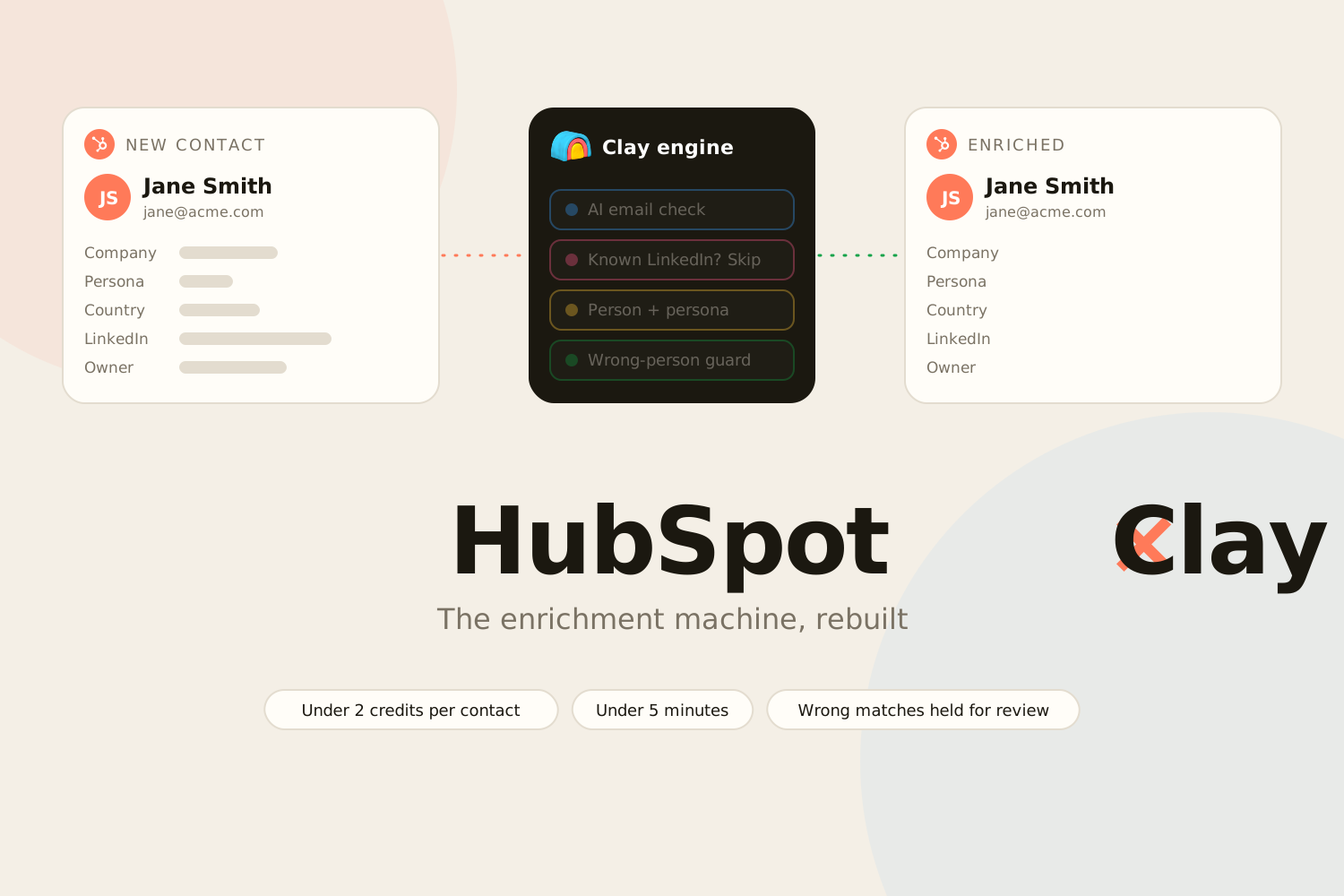
Every inbound contact, fully enriched and routed in under five minutes. I designed the Master Workflow, then rebuilt the Clay engine behind it to cut credit spend, block wrong-person matches and add one-click re-enrichment.
Final Outcome Overview
Every contact entering the CRM now follows one deterministic path: enrichment, customer detection, ownership assignment by traffic source, then segmentation. The full ingestion phase resolves in under five minutes, and a single Master Workflow owns the contact from creation to routing. It replaced what used to be three or four workflows running in parallel.
The practical result is that every downstream campaign workflow can finally assume it's working with complete, classified data. Existing customers never accidentally enter marketing nurture paths, because customer detection happens before routing rather than as an afterthought. And because the workflow drops contacts into a static segment at every decision point, there's a clear audit trail for any contact's journey through the system.
Then I kept going. Over the following months I rebuilt the enrichment engine behind the workflow several times: to stop a credit burn that was emptying our Clay account, to stop bad data from reaching the CRM, and to give the team ways to enrich contacts on demand. In a 100-row test after the rebuild, the main enrichment step cost under 2 credits per contact, down from about 12.7 before.
My Role
I owned this system end to end. I designed the flow, built the HubSpot workflows, properties and segments, built and rebuilt every Clay table, wrote the AI prompts, ran the credit audit, cleaned up the data the old setup had left behind, and built the internal tool the sales team now uses to import lists.
Pain Point to Solve
A contact entering the CRM should be a simple event. In practice, it triggered a small explosion. One workflow tried to set the lifecycle stage, another tried to enrich, another handled segmentation, and another was tied to the specific form that captured the contact. None of these workflows knew about each other. They didn't share state, they had no defined order of operations, and they'd been added over time by different people solving different problems.
The consequences were predictable. Lifecycle stages got set before enrichment finished, so they were based on incomplete data. Contacts got assigned to owners before anyone knew whether they were customers or prospects. Marketing automation enrolled contacts that should have been excluded. And because the workflows were independent, there was no single place to debug when something went wrong.
The underlying problem wasn't enrichment quality or routing logic. It was that nothing owned the contact during the moment when its identity should have been established.
Approach
Before building anything, I mapped the entire intended flow in FigJam: every branch, every condition, every state transition. This forced me to resolve ambiguity before implementation and gave me an artifact I could walk colleagues through. Building the diagram first surfaced edge cases I'd otherwise have hit in production.
The design came down to a few decisions:
- One workflow owns ingestion. Everything else (campaign workflows, nurture sequences, sales notifications) became a downstream consumer that runs only after the Master Workflow finishes. This eliminated the race conditions that came from parallel workflows.
- Customer detection comes first. Before routing or ownership, the workflow checks whether the contact belongs to an existing customer. Putting this before routing means existing customers never accidentally get marketed to, instead of catching them with a downstream filter after the damage is done.
- Traffic source drives ownership. Different acquisition channels map to different sales motions, so owner assignment mirrors where the contact came from. This replaced ad-hoc assignment rules that had accumulated in form-specific workflows over time.
- Enrichment is a state, not a step. Rather than proceeding on a fixed timer and hoping enrichment finished, the workflow treats enrichment as a tracked state it can wait on. This is the load-bearing decision of the whole system.
- Segment at every step. Each decision point adds the contact to a static segment, mostly for observability. When something goes wrong, the segments are the audit trail.
- AI classification where rules get brittle. Some classification problems have too many edge cases to solve with hardcoded lists, so they're handled by lightweight AI with strict prompts. Everywhere else, deterministic logic.
Implementation: The Master Workflow
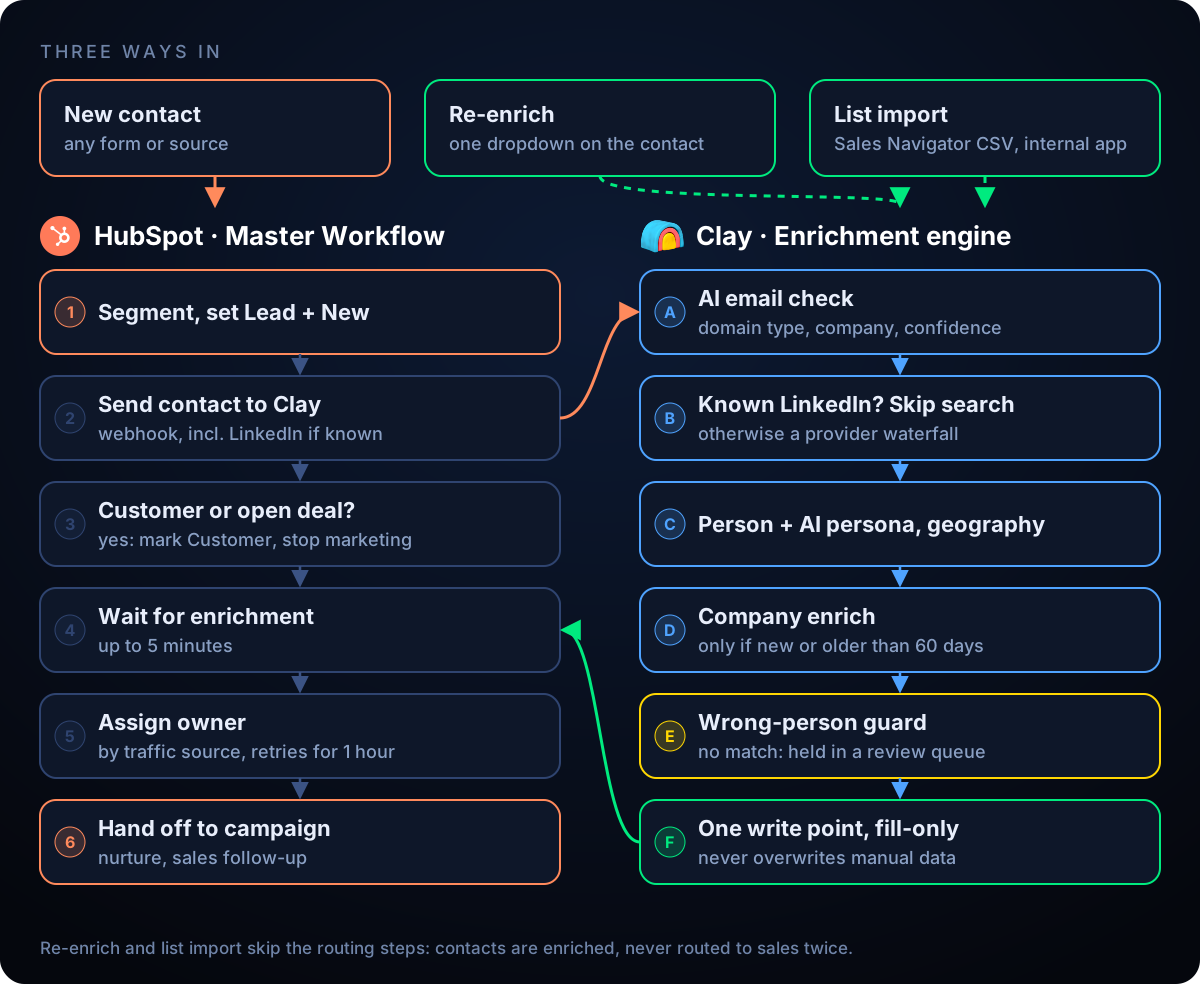
When a contact is created, the Master Workflow takes ownership immediately. It adds the contact to an initial segment, sets lead status to New and lifecycle stage to Lead, then sends a webhook to Clay carrying the contact's data. The workflow then holds on a short delay, which gives HubSpot time to resolve company associations and existing deal links before any branching logic runs.
Clay enriches asynchronously and writes back to the contact record, populating person and company fields along with two AI-driven classifications: personal versus business email (too many regional domain variations to enumerate by hand), and a mapping from Clay's open industry taxonomy onto HubSpot's fixed dropdown of roughly 150 options. A custom property, GTM Enrichment Status, records where the contact sits in the pipeline as pending, complete, or failed, so the state is visible directly on the record without digging into workflow history.
After the delay, the first branch checks whether the contact belongs to an existing customer. If it does, the contact bypasses the marketing path entirely: lifecycle stage is set to Customer, lead status to Closed, and marketing contact status is removed, since there's no reason to market to an existing customer. If the contact is not a customer, the workflow assigns contact and company owner based on traffic source, then hands the contact off to whichever campaign workflow matches what they actually did, such as downloading an ebook or submitting a contact form.
HubSpot and Clay are connected directly, with no middleware between them. Most contacts are fully enriched within five minutes, depending on how long Clay takes to return data.
Rebuilding the Enrichment Engine
The Master Workflow stayed the same. What changed is everything Clay does between receiving the contact and writing it back.
- Cheapest answer first. One AI call reads the email and returns the domain type, company name and a confidence level. Paid lookups only run when they're actually needed: a business email with high confidence, a missing LinkedIn profile, or a company that has never been enriched or was last enriched more than 60 days ago.
- Known data skips the search. If we already have the person's LinkedIn URL, Clay skips the AI search and both provider waterfalls entirely and goes straight to enrichment.
- A wrong-person guard. Before anything is written back, Clay checks that the enriched person actually matches the contact by name, and by employer when the name came from the email address. About 0.8% of rows failed this check. Those stay in a review queue instead of overwriting the CRM with someone else's data.
- One write point, fill-only. A single Clay table writes to HubSpot, only after confirming the record still exists, and it only fills empty fields. Data a person entered by hand is never overwritten.
- Duplicates stopped at the source. Clay had been creating its own company records, and 91% of the recent ones duplicated a company that already existed. I removed that step and let HubSpot's native association handle it. Since then, Clay has created zero duplicate companies, and I merged or flagged the ones it had left behind.
How the enrichment machine works today
Cutting Clay Credits
At one point our Clay account was close to empty. An audit showed it was burning around 5,300 credits a day, and more than half of that went to AI calls. The full pipeline cost more than 22 credits per contact.
- Removed duplicate spend. 26 columns that searched for or validated the same email more than once, some of them able to charge for up to 21 paid steps on a single contact.
- Killed work nobody used. An AI validation column had run 3,350 times, and no other step ever read its output.
- Stopped a redundant waterfall. A second LinkedIn search ran on every row, even when the first one had already found the profile.
- Fixed a loop. A failed company status triggered a fresh, paid company enrichment for every new contact at that company.
- Check before paying. After a re-run on stale rows cost 321 credits for nothing, every paid step now first checks that the HubSpot record still exists.
The result: in a 100-row test after the rebuild, the main enrichment table cost under 2 credits per contact, down from about 12.7 before.
Re-Enrich on Demand
Automation covers new contacts, but people also need a manual way in. I built two.
- One field on the contact. A rep sets a single dropdown on the contact to "Fill missing fields" or "Wrong person, redo", and can paste the correct LinkedIn URL first. A workflow clears the wrong data if needed, sends the contact back through Clay, then resets the dropdown so it can't fire twice. A rep-supplied URL skips the paid search, and re-enriched contacts are never routed to sales a second time.
- Bulk imports from Sales Navigator. I built a small internal web app where the sales team uploads a Sales Navigator export. It removes duplicate people, checks HubSpot first, creates only the contacts that don't exist yet, tags the ones that do, and sends everything through the same enrichment pipeline. It refuses to run the same list twice. Over 800 contacts across six European markets came in this way, at about 2.2 credits each.
A related clean-up shows why this matters: after one bulk import, 726 contacts were classified with the persona "Other". After fixing the enrichment logic and re-enriching them, that dropped to 100, of which 47 really are "Other".
Tech Stack
HubSpot is the system of record and the orchestration layer. The Master Workflow, the lifecycle and lead-status logic, the segmentation, and the custom enrichment-state property all live there.
Clay handles enrichment: HubSpot sends a new contact's data to Clay, which returns enriched person and company fields plus the AI classifications, then writes back to the contact record. The two are wired together directly, without an intermediary automation tool.